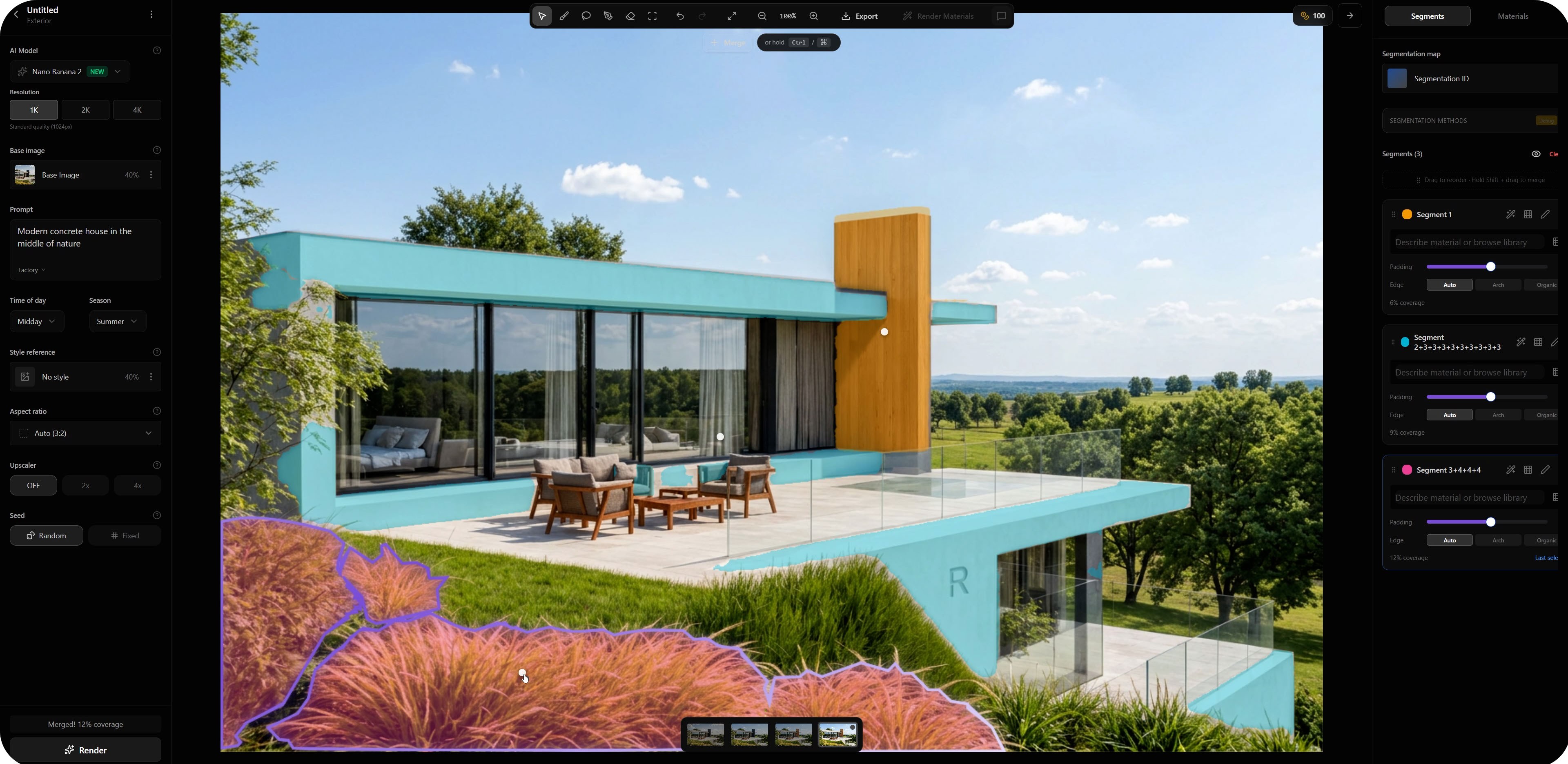
Architectural visualization is not a generic image generation task. Every material, opening, structural element, and landscape feature has a specific purpose within the design.
A window cannot simply move because another part of the image was changed. A concrete facade should not suddenly become stone. Vegetation should not cover the main entrance unless that is part of the architectural intent.
This is why segmentation is essential for accurate AI rendering.
Segmentation divides an image into editable areas and allows architects to control which parts should change and which parts should remain untouched. With Rendero 2.0, this process is faster and more accessible thanks to intelligent automatic segmentation and regional rerendering.
The problem with full image regeneration
When an AI model regenerates the entire image, every part of the design becomes open to interpretation.
Even a simple request such as changing the facade material can accidentally affect windows, roof details, furniture, surrounding vegetation, lighting, or camera composition.
The first result may look attractive, but important architectural decisions can be lost between iterations. The architect improves one part of the image while unintentionally damaging another part that was already correct.
Segmentation reduces this risk by defining clear boundaries for every requested change.
What is image segmentation?
Image segmentation separates a visualization into individual areas based on objects, materials, or architectural elements.
For an exterior visualization, these areas might include:
- Windows and glass surfaces
- Facade materials
- Roofing
- Terraces and balconies
- Roads and paving
- Vegetation
- Sky
- Water
For an interior, segments can represent walls, flooring, furniture, lighting fixtures, curtains, windows, or individual materials.
Each segment becomes an editable region that can be adjusted independently from the rest of the image. Instead of asking the AI to reinterpret the complete scene, the architect can focus the generation process on one specific area.
From manual masks to intelligent automatic segmentation
In earlier workflows, segments often had to be prepared manually. Users could draw masks around individual objects or upload a specially prepared segmentation map.
This offered a high level of control, but preparing accurate masks could take time, especially in complex scenes.
Rendero 2.0 introduces intelligent automatic segmentation. After uploading an image, Rendero analyzes the scene and detects important visual regions automatically.
Surfaces, objects, materials, architectural elements, and landscape areas can be identified and turned into editable segments directly inside the interface.
There is no need to trace every window, wall, or piece of furniture before making a targeted adjustment. The user simply selects the detected area and defines what should happen there.
Automatic segmentation makes controlled AI rendering available even when the user does not have a prepared ID map or access to the original 3D scene.
Regional rerendering changes only what needs to change
Automatic segmentation becomes especially powerful when combined with regional rerendering. Regional rerendering allows Rendero to regenerate only the selected part of the visualization while preserving the surrounding image.
For example, an architect can:
- Replace plaster with exposed concrete
- Test a different type of timber cladding
- Change the paving around an entrance
- Refine the reflections in a glass facade
- Add denser vegetation to one part of a garden
- Adjust furniture without rebuilding the interior
- Change the sky while keeping the architecture intact
The selected region receives a new instruction, while the remaining composition stays protected.
This creates a more predictable workflow. Instead of generating complete alternatives and hoping that important details survive, teams can improve the visualization gradually and intentionally.
Architectural materials need clear boundaries
Material accuracy is one of the most important reasons to use segmentation.
In architecture, materials are not decorative filters. They define construction logic, proportions, joints, surface behavior, and the relationship between individual elements.
Wood should follow the geometry of the cladding. Glass should remain within the window frame. Concrete should not spread into surrounding vegetation. Paving should respect edges, steps, curbs, and entrances.
Without segmentation, an AI model may blend materials across object boundaries or reinterpret the form of the building. Segments provide a spatial structure that helps keep each material in its intended location.
This is particularly useful when testing several material options for the same project. The architect can compare alternatives without changing the overall design.
A bridge between 3D and AI
Automatic segmentation makes the workflow faster, but professional users can still connect Rendero with more advanced 3D pipelines.
Material ID maps and object ID maps created in applications such as 3ds Max, Blender, Cinema 4D, or Maya can define highly precise regions based directly on the 3D model.
In an ID map, each object or material is represented by a unique color. Rendero can interpret these colors as separate editable areas.
This approach is useful when pixel level accuracy is required or when a team already has a structured visualization pipeline.
An ID map can separate elements such as:
- Window glass
- Window frames
- Facade plaster
- Timber cladding
- Roofing
- Balustrades
- Terraces
- Water surfaces
- Individual landscape areas
Automatic segmentation and ID maps are not competing methods. They provide different levels of preparation and control.
Automatic segmentation is ideal for speed, accessibility, and direct editing. ID maps remain valuable for advanced workflows where the exact boundaries are already defined inside the 3D scene.
Manual segments still have a purpose
Automatic detection can handle most common situations, but users may still want to define a custom segment manually.
Manual segments are useful when:
- A very specific detail needs to be isolated
- Several detected areas should be edited together
- The desired region does not follow a standard object boundary
- An unusual material or design element needs additional precision
- The user wants complete control over the editable area
This creates a flexible workflow. Rendero can prepare the initial segmentation automatically, while the architect can refine or create additional regions whenever necessary.
Define each region with text
Once a segment is selected, it can be controlled using a focused text description.
Instead of writing a general prompt for the entire image, the description applies only to the selected region.
Example instructions might include:
- Light exposed concrete with subtle formwork texture and natural surface variation
- Clear architectural glass with realistic reflections and visible interior depth
- Warm oak cladding with narrow vertical boards and a matte finish
- Dense ornamental grasses with a natural mix of green and dry tones
- Dark metal window frames with a fine matte surface
Because the instruction is connected to a defined region, it becomes easier for the AI model to understand what should change and where the change should happen.
A controlled iteration process
Architectural design develops through a sequence of decisions.
Teams test materials, adjust atmosphere, refine landscaping, compare facade options, and respond to client feedback. These decisions rarely happen all at once.
Regional rerendering supports this natural process.
A typical workflow can look like this:
- Upload a base render, screenshot, sketch, or visualization.
- Let Rendero detect the main segments automatically.
- Select the area that needs improvement.
- Describe the desired material, object, atmosphere, or visual change.
- Rerender only the selected region.
- Review the result and continue with another area if needed.
Each step focuses on one decision. This makes the process easier to evaluate and reduces the possibility of unwanted changes elsewhere in the image.
Preserve what is already correct
One of the most valuable principles in professional visualization is simple: do not change what is already working.
If the composition, building geometry, camera position, and most materials are correct, there is no reason to regenerate the complete image.
Segmentation protects finished parts of the visualization while allowing selected areas to evolve.
This is especially important during later project stages, when clients have already approved most of the design and only a few elements need further refinement.
A targeted change is easier to communicate, easier to compare, and easier to approve.
Faster feedback for teams and clients
Segmentation also improves collaboration.
When a client asks to test a darker facade, add more greenery, or change the furniture, the visualization team does not need to rebuild the entire scene or generate many uncontrolled alternatives.
The requested area can be selected and rerendered directly.
This makes revisions faster and keeps each visual iteration connected to a clear design decision.
Teams can present multiple variations of one element while maintaining the same camera, geometry, lighting logic, and overall composition.
From random generation to an architectural tool
AI becomes useful for architecture when it respects boundaries.
The goal is not simply to produce an impressive image. The goal is to improve a specific design without losing the decisions that already define the project.
Intelligent automatic segmentation gives users an immediate way to identify editable areas. Regional rerendering allows those areas to be refined directly in place. Manual masks and ID maps provide additional precision when required.
Together, these tools transform AI rendering from a complete image regeneration process into a controlled architectural workflow.
Conclusion
Segmentation is the foundation of accurate AI assisted architectural rendering.
It protects geometry, preserves material logic, and allows teams to control individual parts of a visualization independently.
With Rendero 2.0, intelligent automatic segmentation removes much of the preparation that was previously required. The system detects important regions for you, while regional rerendering changes only the selected part of the image.
For advanced workflows, users can still work with manual masks and material ID maps prepared in their preferred 3D software.
The result is a flexible system that combines speed with precision.
Main claim: Segmentation turns AI rendering into a controlled architectural tool.